

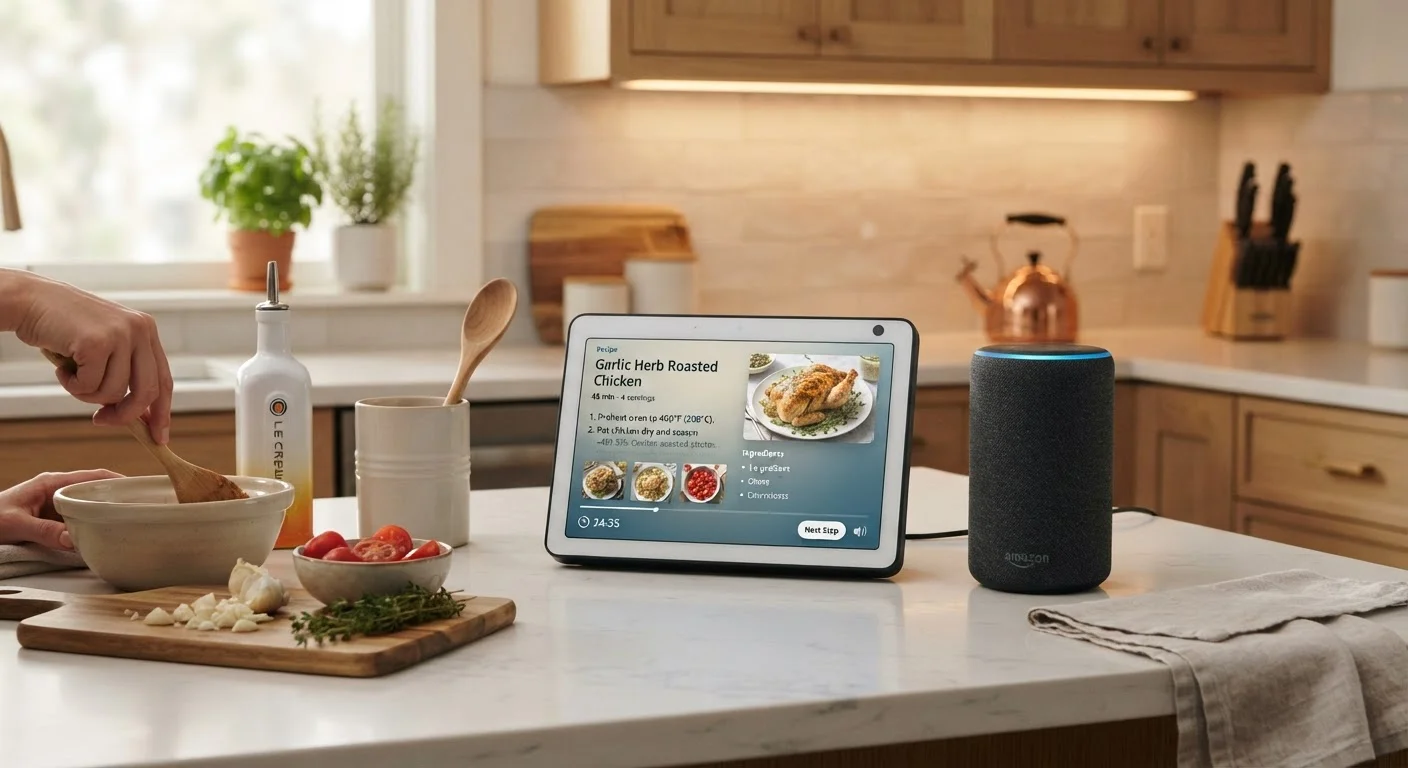
Option A
Smart Display
The screen-equipped, visual-first assistant hub.
Best for: Households that want video calling, recipe walkthroughs, visual timers, and a central control dashboard they can glance at.
Option B
Smart Speaker
The compact, audio-focused voice assistant.
Best for: Anyone who wants quick voice commands, music streaming, and smart home control without adding a screen to the room.
What Sets These Two Devices Apart
Smart displays and smart speakers share the same core technology: a built-in voice assistant, Wi-Fi connectivity, and the ability to control compatible smart home devices. What separates them is the addition of a screen. A smart display pairs the speaker hardware with a touchscreen - typically ranging from about 5 to 15 inches - allowing it to show visual information such as weather forecasts, calendar appointments, video calls, and cooking guides.
A smart speaker, by contrast, communicates entirely through audio. It answers questions by speaking, plays music, sets timers, and triggers smart home routines - all without any visual output. This makes it simpler by design, but it also means any information it returns has to be short enough to be heard and remembered rather than read.
The distinction matters most in rooms where you interact with a device while doing something else. In a kitchen, being able to glance at a 4-step recipe is very different from pausing to listen to all four steps read aloud. For a broader look at how display technology affects everyday viewing, see our guide to display panel types.
| Criterion | Smart Display | Smart Speaker |
|---|---|---|
| Screen | Yes, touchscreen (5-15 inches) | No screen |
| Primary interaction | Voice + touch | Voice only |
| Video calling | Yes, with built-in camera | Audio calls only |
| Recipe assistance | Step-by-step visual display | Audio readout only |
| Typical price range | Higher (screen adds cost) | Lower entry point |
| Physical footprint | Larger, screen-forward | Compact, cylindrical |
| Smart home control | Voice + visual dashboard | Voice commands |
| Best room fit | Kitchen, home office | Living room, bedroom |
Where Each Device Fits Best in Your Home
Location shapes which device makes more sense. In a kitchen, a smart display earns its keep through recipe walkthroughs, visual cooking timers, quick unit conversions you can reread, and video calls to a family member in another room. The touchscreen is especially useful when your hands are wet or covered - you can still tap the screen to advance a step without speaking.
In a living room, the calculus shifts. If your TV is already nearby, a smart display's screen duplicates something you already have. A smart speaker fits more naturally here: it handles music requests, answers trivia during game night, controls your smart lights, and does so without competing visually with the television. That said, if you want drop-in video calls or a dedicated home security camera viewer independent of your TV, a display makes sense in the living room too.
Bedrooms and smaller spaces tend to favor smart speakers, where ambient light from a screen can be disruptive at night, though many displays include an adaptive brightness mode to address this. For a parallel comparison in a different product category, our desktop vs. laptop guide walks through how form factor affects daily use in similar ways.
~35%
U.S. households with a smart speaker or display
According to Edison Research's Infinite Dial report, roughly one in three American households owned at least one smart speaker or smart display as of recent survey years.
5-15 in
Typical smart display screen sizes available
Screen size affects both readability and countertop footprint - smaller models suit tight kitchens while larger ones function as room hubs.
Smart Home Compatibility and Setup Considerations
Both device types work with the major smart home ecosystems - Amazon Alexa, Google Home, and Apple's HomeKit framework - though individual products align with specific platforms. Before purchasing either device, confirm it supports the voice assistant ecosystem you already use, since switching platforms later typically means replacing all your paired accessories as well.
The newer Matter standard (a cross-platform smart home protocol launched in 2022) is gradually improving interoperability, but not every device on the market supports it yet. It's worth checking compatibility if you own a mix of brands.
Setup for both device types is generally straightforward: plug in, download the companion app, and follow guided prompts. Smart displays have one additional step - configuring screen preferences, ambient display modes, and camera privacy settings. If you're new to the category, our first-time smart speaker setup guide covers the core process that applies to both device types. For context on how smart devices fit into a broader home electronics setup, the Everything Home Electronics hub is a useful reference.
Privacy Settings Matter on Both Devices
Both smart speakers and smart displays use always-on microphones to listen for a wake word. Most models include a physical mute button or switch that disables the microphone at the hardware level. Smart displays with cameras also typically include a physical camera shutter. Reviewing and configuring these settings during setup - rather than leaving defaults in place - gives you direct control over what the device can capture. Check the manufacturer's privacy documentation for specifics on data storage and deletion.
The content on this site is for informational purposes only and is not a substitute for professional advice. Always consult a qualified professional for guidance specific to your situation.