

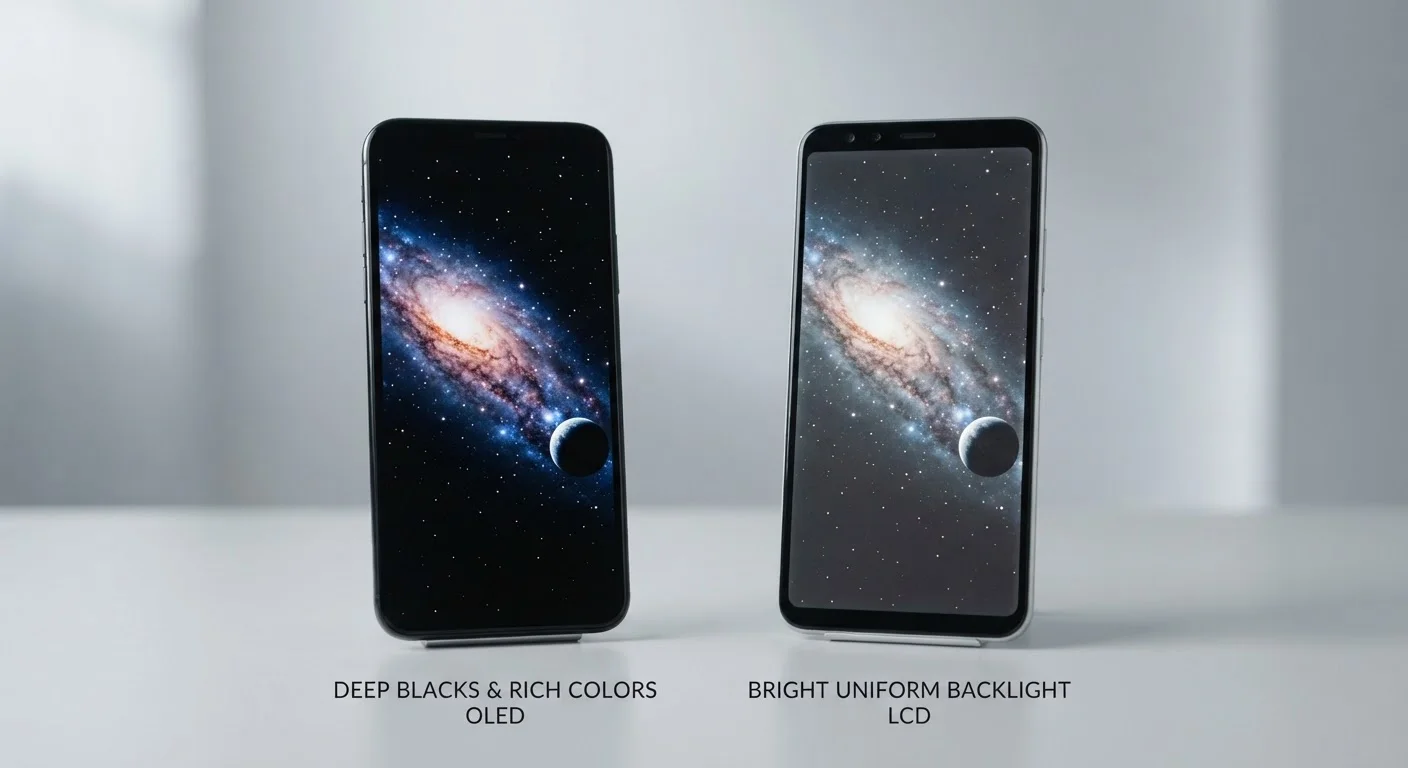
Option A
OLED Screens
The pixel-level lighting technology prized for contrast and color depth.
Best for: Users who watch a lot of video, use dark mode frequently, or want the most vivid-looking display.
Option B
LCD Screens
The proven backlit panel technology offering consistent brightness and durability.
Best for: Users who spend a lot of time outdoors, prioritize screen longevity, or are working within a tighter budget.
How Each Technology Actually Works
Understanding the real-world differences starts with grasping one key distinction in how each screen type creates light.
LCD stands for Liquid Crystal Display. An LCD screen uses a backlight - typically a layer of LEDs - that shines through a panel of liquid crystals, which open or close to control how much light passes through to each pixel. The backlight is always on when the screen is active, regardless of what's being displayed.
OLED stands for Organic Light-Emitting Diode. In an OLED screen, each individual pixel generates its own light and can switch off completely. There is no separate backlight. This is the fundamental difference that drives nearly every practical distinction between the two technologies.
For a broader look at how these panel types also apply to TVs and monitors, see how OLED, QLED, and LED panels compare in home electronics.
| Criterion | OLED | LCD |
|---|---|---|
| Black levels | True black (pixels off) | Dark grey (backlight on) |
| Contrast ratio | Very high | Moderate to high |
| Color vibrancy | Rich, highly saturated | Accurate, less saturated |
| Outdoor brightness | Varies; high-end models excel | Generally consistent and strong |
| Battery impact (dark mode) | Lower draw on dark content | Constant draw regardless of content |
| Burn-in risk | Possible with heavy long-term use | Not susceptible |
| Typical price range | Mid-range to premium | Budget to mid-range |
| Thinness potential | Thinner (no backlight layer) | Slightly thicker construction |
What You'll Notice Day to Day
Spec sheets describe displays in technical terms, but the real question is what each technology means when you're scrolling through your phone at the kitchen table or squinting at it outside on a sunny afternoon.
Contrast and Black Levels
This is where OLED has the clearest advantage. Because pixels switch off to produce black, OLED screens display true, deep blacks rather than the dark grey that LCD panels show. This is immediately visible when watching any content with dark scenes or when viewing an image with a dark background. The perceived contrast - the difference between the brightest and darkest parts of an image - is significantly higher on OLED.
Color Vibrancy
OLED screens tend to produce more saturated, punchy colors. Whether that's a positive depends partly on personal preference; some users find OLED colors almost oversaturated, though most manufacturers now offer color calibration settings to tone this down.
Outdoor Visibility
LCD screens often hold up well in direct sunlight because their consistent backlight can sustain high brightness levels reliably. Some high-end OLED phones can match or exceed this, but mid-range OLED panels may struggle more in harsh outdoor light.
Battery and Dark Mode
On OLED screens, using dark mode across your apps genuinely reduces how many pixels are lit at any given moment, which can lower power consumption during those sessions. On LCD, switching to dark mode has minimal effect on battery draw because the backlight stays on regardless.
~1,000,000:1
Typical OLED contrast ratio
OLED panels commonly achieve contrast ratios around one million to one, compared to roughly 1,000-5,000:1 for typical LCD panels, due to their per-pixel light control.
15-30%
Potential battery savings with dark mode on OLED
Studies by Google's Android team have indicated that running a predominantly dark UI on an OLED screen can reduce display power consumption meaningfully compared to a white or light interface.
For more on how display specs interact with everyday phone usability, read about why phones with similar specs can feel completely different to use.
The Burn-In Question and Long-Term Durability
One concern that comes up frequently with OLED screens is burn-in - a gradual, permanent ghosting of static images (like a navigation bar or keyboard) that can develop over years of heavy use. LCD panels are not susceptible to this issue in the same way.
In practice, burn-in on modern OLED phones tends to develop slowly and is more likely to appear after several years of very heavy daily use with high brightness. Manufacturers have introduced various software mitigations - such as shifting pixel positions slightly and managing brightness automatically - to reduce the risk. For most users under normal usage patterns, burn-in may never become a visible issue during a typical two- to three-year device lifespan. However, it remains a legitimate consideration for users who keep devices for four or more years or who leave static content on screen for extended periods.
A Note on AMOLED and Super AMOLED
You may see terms like AMOLED or Super AMOLED on phone spec pages. These are variants of OLED technology - AMOLED stands for Active Matrix OLED. They operate on the same fundamental principle as standard OLED (each pixel emits its own light) and share the same core trade-offs. The naming differences reflect manufacturer branding and certain engineering refinements rather than a completely different technology.
If display longevity across a multi-year ownership period matters to you, it's also worth reading about how screen size affects long-term comfort and battery trade-offs alongside panel type.
Refresh Rate, Resolution, and Display Quality Beyond Panel Type
It's important to note that OLED vs. LCD is only one dimension of display quality. Both technologies are available with different resolutions and refresh rates - a spec that affects how smooth scrolling and animation feel on screen.
A well-implemented LCD screen can outperform a poorly calibrated OLED display in real-world conditions. Panel type sets the ceiling for certain characteristics - like black levels - but software tuning, brightness calibration, and glass quality all shape what you actually see. This is why comparing screens in person, if possible, gives a more accurate picture than specs alone.
For those evaluating displays across device categories, laptop display terminology follows many of the same principles and may help build a fuller understanding of panel specs overall.
The content on this site is for informational purposes only and is not a substitute for professional advice. Always consult a qualified professional for guidance specific to your situation.